PazBy

Everything PazBy can do for you

A radar that works at home and abroad — and respects your battery, your data, and your attention.

Smart radar that does not eat your battery

PazBy uses a multi-mode gearbox under the hood. When you stop moving, the radar drops into deep sleep — no GPS polling, no callbacks. The moment you start a trip, it spins up to the right cadence for your speed: 15-second ticks walking, 5 seconds driving, 2.5 seconds at highway pace. A dedicated burst mode kicks in the moment you leave home, so saved places close to your front door fire reliably even on foot.

Real-world result: a normal day with 5–10 saved zones costs 2–5% of your battery over 24 hours. Sleeping overnight costs effectively zero.

Everything's controlled from the Settings tab — flip the Radar off entirely, mute Voice announcements, or dive into Permissions, Cloud backup, Travel Mode, Approach alerts, Default radius, Default colors, Daily digest, Speed-adaptive zoom, and Icon visibility.
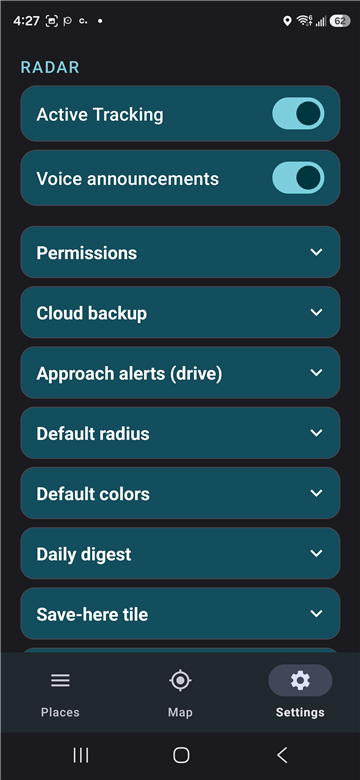
PazBy Settings tab with master toggles and configuration sections

Three ways to save a place

Long-press the map: hold your finger down anywhere. The save dialog opens at that exact spot — name it, pick a radius, save.

Tap a Google POI: see a labelled place on the map? A single short-tap quick-saves it as a Pin with the POI name.

Share from Google Maps: find a place in Google Maps, tap Share, pick PazBy. The save dialog opens at the shared location.

Coming from Google Keep? Open the Keep note's pinned location, tap to hand it off to Google Maps, then Share → PazBy. Full migration guide →

Browse and manage your places

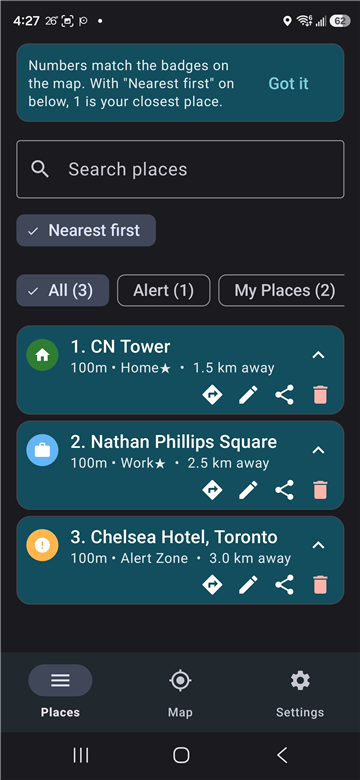
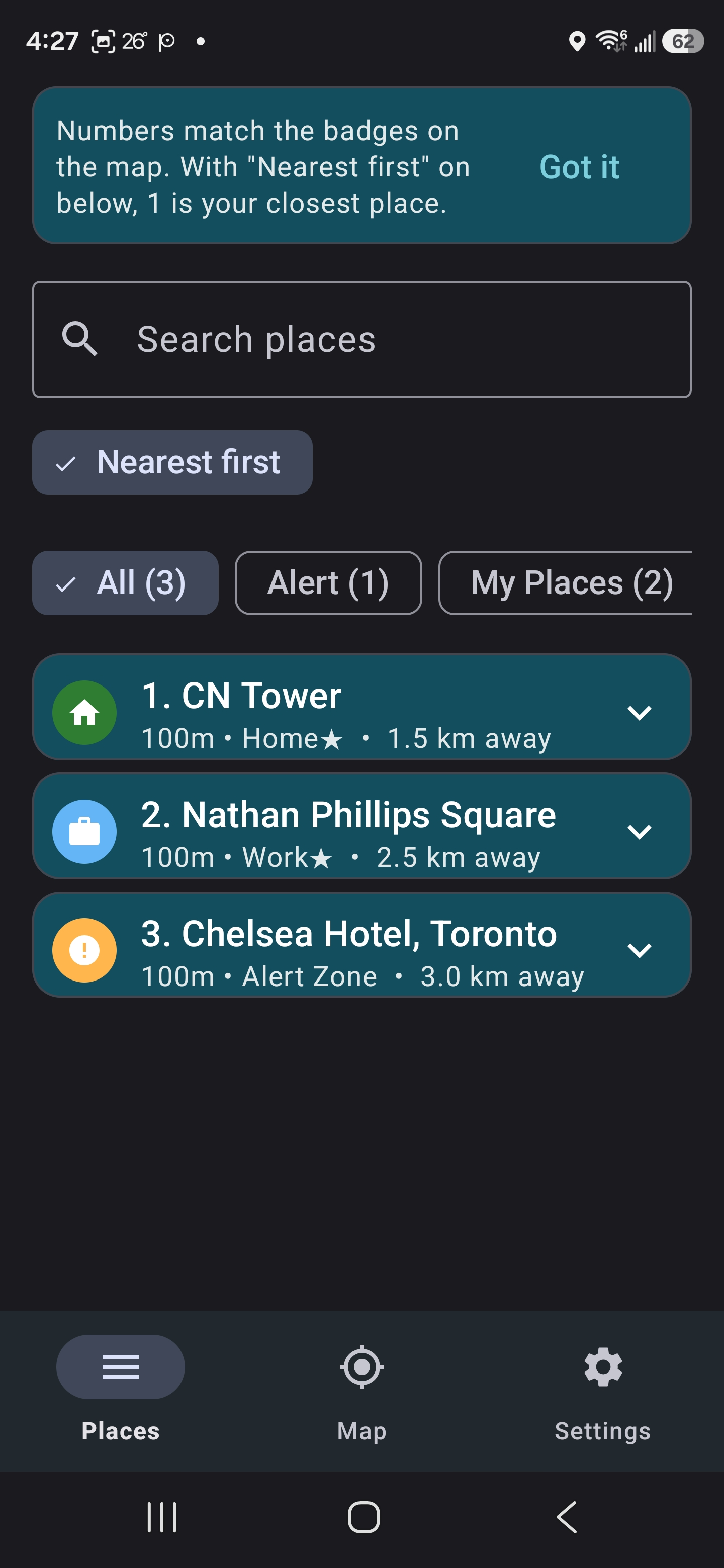
The Places tab lists every saved zone, sorted by distance from where you are right now. The numbers line up with the badges on the map, so place “1” in your list is the place “1” pin on the map.

Tap the chevron on any row to open the action drawer: Directions (opens Google Maps for navigation), Edit (open the zone settings dialog), Share (send the place to a friend), Delete (remove it).

Filter chips at the top let you narrow the list by zone type — All / Pins / My Places / Hazard / Date gated / Travel. The Travel chip shows only places saved in countries other than your home country; Date gated shows only places with an Available-on-Date/Time schedule.

Zones that adapt to your life

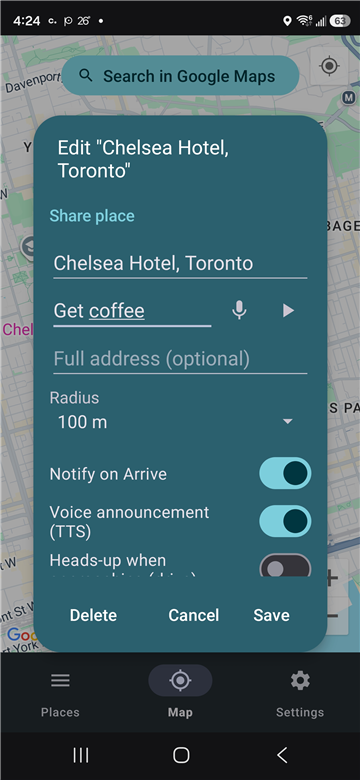
Double-tap any saved place on the map (or tap it in the Places list) to open the edit dialog. Everything's customisable per zone.

Auto-filled address. When you save a place, PazBy reverse-geocodes the coordinates and drops the street address into the dialog under the name. Edit it if the result doesn't match the actual entrance — the address travels with shared links and shows in the Places list.

Reminder text. A short note — “Get coffee” or “return drill bits.” The field starts as one line and grows up to five as you type (up to 500 characters). When you arrive, the reminder shows in the notification body as “Canadian Tire — return drill bits” AND the voice announcement reads it out.

One-shot zones. Auto-delete after first arrival. Perfect for the place a coworker mentioned that you'll only visit once, or the must-see restaurant on a trip you won't revisit for years.

Approach alerts. Heads-up before you arrive — opt-in per zone, with a global silencer in Settings.

Available on Date/Time. Tag a zone as visible only on specific days or during specific hours. A Wednesday-only deal, a 17:00–19:00 Happy Hour spot, a Saturday-morning farmer's market — outside the window the place hides from the map AND the Places list AND silences alerts.

Custom icons + colors. Pick from a library of category icons. Override the color per zone.

Per-zone notification toggles. Mute the arrival notification, the voice announcement, or both — independently of the global Voice announcements switch.

PazBy zone edit dialog showing radius, notification toggles, reminder text, and share/delete actions

Travel Mode

One toggle in Settings. Off (default): your home-country places show; foreign-country places hide. On: every saved place shows, regardless of country. The Travel filter chip on the Places tab does the inverse — shows only your foreign-country places — so you can scan a destination list without your everyday errands in the way.

Home country is auto-detected from your Home zone, your current GPS fix, or your device locale (in that order). PazBy tags each new place with its country at save time and silently backfills older places without one.

Important: Travel Mode is purely about visibility. The radar always fires alerts regardless of which side of the toggle you're on. Flying to Paris with PazBy off doesn't mean missing the bakery you saved — it just means you don't have to scroll past it in your home list until you get there.

Spot the cluster nearby

A small red button on the top-left of the Map screen — mirroring Google's own “Centre on me” button on the top-right.

Tap it once and the map zooms out to frame every saved place within 100 km of where you are right now. So if four of your errands are in the same neighbourhood, you see them all at a glance and can plan the most efficient route. Travel pins you saved for next year's vacation stay off-frame so the local cluster doesn't get yanked across the country.

Combined with the “Nearest first” sort on the Places tab — where numbered badges match the same numbers on the map markers — this turns into a quiet errand-planning surface. The bank trip becomes “and three other things while I'm in the area” without a spreadsheet.

PazBy Map tab with multiple numbered Pin badges visible after a zoom-to-fit tap

Hand off to Waze (or Google Maps) in one tap

PazBy doesn't try to be a turn-by-turn navigation app — it's the radar that quietly tells you you're nearby. When you actually need driving directions, you tap the place and a small set of options appears: Google's own Get directions and Open in Google Maps icons pop up over the marker, and a cyan Waze button fades in on the left edge of the map, right below the red “zoom to nearby pins” button.

Three navigation hand-offs visible at once. Pick whichever fits the moment — Google Maps for general routing, or Waze for real-time traffic + accident + speed-trap reports from other drivers on your route. The Waze button also lives on each saved-place row in the Places tab (one of the five icons that appear when you tap a row's chevron — Directions / Waze / Edit / Share / Delete) for one-tap navigation without opening the Map view first.

Don't have Waze installed? Tapping the Waze button opens a Waze web page showing the destination with a one-tap install link to Google Play. PazBy doesn't push you to install Waze — the button's just there if you want it.

Why pair Waze with the red “nearby pins” button? Tap the red button to frame every saved place within 100 km of where you are now → tap any pin in the cluster → tap Waze → driving in real-time-traffic-aware navigation toward the closest errand. Two taps from “what should I run today?” to “on my way.”

Your data, on your phone

Saved places live in a SQLCipher-encrypted database on your device. There is no PazBy server. There is no PazBy account. There is no signup form, because there is nothing to sign up for.

Optional encrypted backups go to your own Google Drive, derived from a passphrase only you know. PazBy can't decrypt them; only your phone, running PazBy with your passphrase, can.

See what your radar has been doing

Optional daily digest notification, at the time of your choice. Quiet, low-priority — just a one-line summary of the past 24 hours.

“5 arrivals at 3 places — Home (×3), Canadian Tire, Tim Hortons.” Skip entirely on empty days, no attention burn.

Share a place with a friend

Long-press a saved zone, tap Share. PazBy emits a single HTTPS link that works for both audiences. If your recipient has PazBy installed, the link opens directly in the save dialog with your curated name, address, radius, icon, color, and reminder note all pre-filled — they hit Save and they're done. If they don't have PazBy, the same link opens a small fallback page that shows the place, offers an “Open in Google Maps” button, and links to install PazBy.

The link is a verified Android App Link, so messengers auto-linkify it and the routing happens without a chooser dialog or browser detour.

Ready to try it?

Save your first place in under a minute. One-time $2.99.